

Open your own website on your phone, using mobile data, while standing somewhere with average signal. How long before you can actually read something? If you found yourself waiting, your customers are waiting too, and many of them are not as patient as you. They simply go back and tap the next result.
Website speed is one of those problems that quietly costs money. You do not see the visitors who left, you only see that enquiries are low. In this guide, we explain what Core Web Vitals are in simple language, the most common reasons websites are slow, and the practical fixes that actually make a difference.
Speed affects three things that every business cares about.
This matters even more in India, where a large share of browsing happens on mobile phones, often on mid-range devices and variable networks. A site that feels fine on a fast office computer can feel painfully slow on a phone in a busy market.
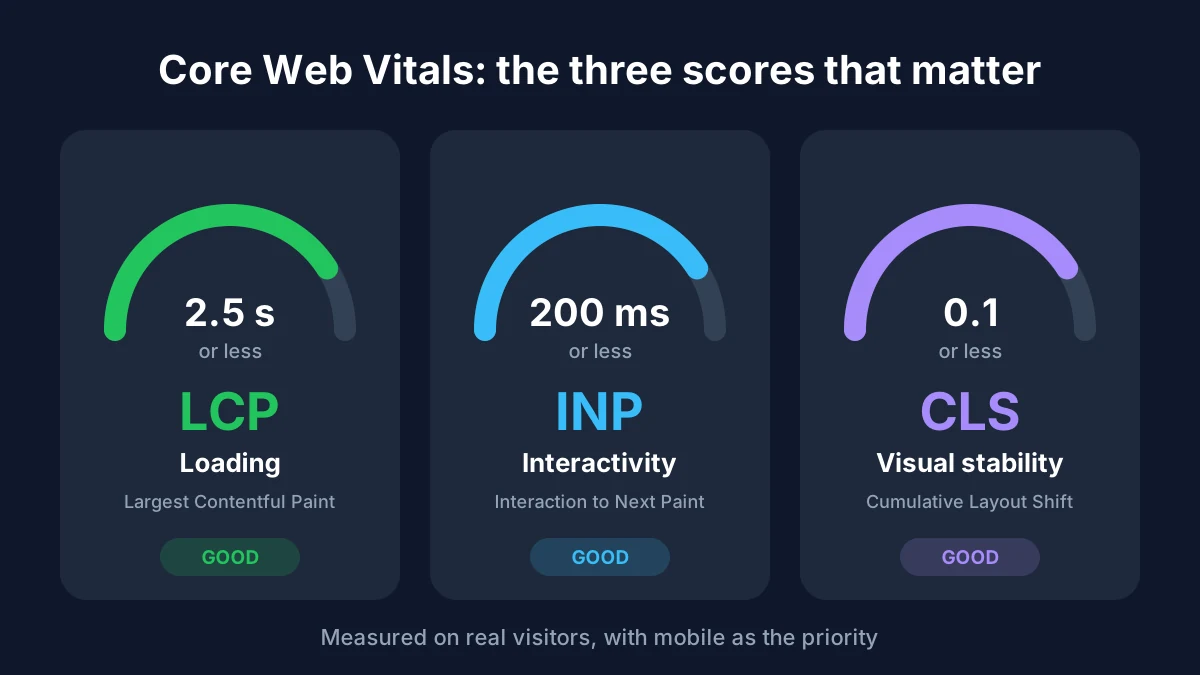
Core Web Vitals are three measurements, defined by Google, that describe how a page feels to real users. They focus on loading, interaction, and visual stability. Instead of guessing whether your site is "fast", they give you numbers to check.
LCP measures how long it takes for the biggest visible element, such as a hero image or main heading, to load. To be rated good, it should happen within 2.5 seconds.
INP looks at how fast the page reacts when someone taps a button, opens a menu, or types in a form. It replaced the older First Input Delay metric. A good score is 200 milliseconds or less.
Have you ever tried to tap a button and the page suddenly shifted, so you hit something else? That is layout shift. CLS measures it, and a good score is 0.1 or lower.
These targets are based on how real visitors experience your page, and you can read the official definitions on Google's web.dev.
You do not need to be a developer to get a first picture. Paste your web address into Google PageSpeed Insights. It shows your Core Web Vitals, separates mobile and desktop results, and lists specific problems with suggestions.
Two tips when you read the report. First, look at the mobile results, since that is where most of your visitors are. Second, do not chase a perfect 100 score. The goal is a smooth experience for real people, so focus on passing the three Core Web Vitals and fixing the biggest issues first.
This is the number one culprit on business websites. A photo taken on a phone or exported straight from a design tool can be several megabytes. Placing it on a page without resizing or compressing it forces every visitor to download it.
If your server is slow to respond, nothing else can make up for it. Shared hosting with too many websites on one machine often leads to long waiting times before the page even starts loading.
Every plugin, chat widget, tracking tag, and slider adds code that the browser must download and run. Many sites carry plugins nobody remembers installing. This hurts both loading and responsiveness.
Some ready-made themes and builders include large amounts of code for features you will never use. The result is a website that looks good but carries unnecessary weight.
Loading many font styles, or heavy animation files and videos on the first screen, slows down the first impression. Motion can look great, but it must be built with care. We cover how to keep it light in our guide to kinetic typography and motion graphics.
Without caching, the server rebuilds the same page for every visitor. Without a content delivery network (CDN), people far from your server wait longer for files to travel. Both are fixable.
Slow back end queries, bloated databases, and outdated software can drag a site down from the inside. This is where good full stack work makes a visible difference.
Here is a sensible order to work through, starting with the changes that usually give the biggest result for the least effort.
Some speed problems cannot be patched later. If a website is built on a heavy foundation, you can only improve it so far. This is why the technology choice at the start matters, and why we explained how to pick one in our guide on choosing the right tech stack for your business website.
Similarly, if your customers mostly browse on phones, an app-like, lightweight experience can make a big difference. Our article on progressive web apps vs mobile apps shows how a well-built site can load fast, feel smooth, and even work with a weak connection.
And if you are planning a full redesign, it is worth reading what a modern business website needs in our post on web development in 2026, so speed is part of the plan from day one rather than an afterthought.
A good target is for the main content to appear within about 2.5 seconds on mobile. The faster, the better, but this is the benchmark Google uses for a good LCP score.
They are part of Google's page experience signals, so they can influence how a site performs in search. They are one factor among many, and relevant, high-quality content still matters most.
Phones usually have less processing power and slower connections. Large images, heavy scripts, and complex layouts that run fine on a computer can struggle on a phone.
It can, especially if your current server is slow or overcrowded. Hosting is only one part of the picture though, so images, code, and plugins should also be checked.
A quick check every month or two is a good habit, and always after you add new plugins, features, or large amounts of content.
A fast website is not a luxury. It is part of how customers judge your business in the first few seconds. Core Web Vitals give you a clear way to measure that experience, and most speed problems come down to a handful of fixable causes: heavy images, weak hosting, too many scripts, and code that was never optimized.
Start by testing your site on mobile, fix the biggest issues first, and make speed a regular habit rather than a one-time project. If you would like an expert review of your website, the team at Alien Web Solutions can check your performance, find what is slowing you down, and fix it. Get in touch and let us make your website faster.